 All Categories








No products in the cart.
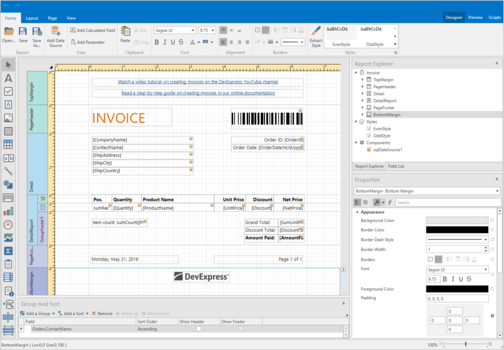
DevExpress Reporting
Create and deliver rich, interactive, and printable reports for WinForms, WPF, Blazor, ASP.NET Core, MVC, and .NET MAUI applications — fast, flexible, and fully customizable.
767.00$
Description
DevExpress Reporting
DevExpress Reporting is a comprehensive, cross-platform reporting solution designed to help developers build elegant, data-driven reports for both desktop and web applications. With seamless integration for WinForms, WPF, Blazor, ASP.NET Core, MVC, and .NET MAUI, this toolkit empowers you to deliver high-performance, pixel-perfect reports with minimal effort.
Build Powerful Reports with Ease
From simple data tables to complex analytical dashboards, DevExpress Reporting offers everything you need to visualize information and export it to popular formats such as PDF, Excel, Word, HTML, and Image. Developers can create interactive, dynamic, and fully customizable reports using visual designers or code-based generation — all without writing complex rendering logic.
Key Features
- Cross-platform support: Build and deploy reports on WinForms, WPF, Blazor, ASP.NET Core, MVC, and .NET MAUI platforms.
- Visual report designer: Create and modify reports visually using intuitive drag-and-drop tools in Visual Studio or runtime designers.
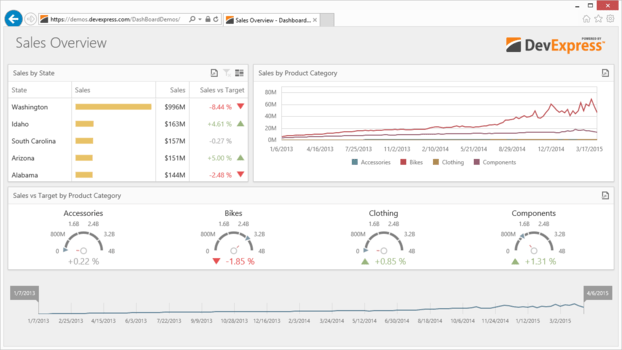
- Rich data visualization: Add charts, gauges, pivot grids, and maps to make reports informative and interactive.
- Dynamic data binding: Connect to SQL databases, Entity Framework, JSON, REST APIs, and other data sources with ease.
- Flexible export options: Export to PDF, Excel, Word, HTML, MHT, RTF, CSV, and image formats with one click.
- Interactive features: Parameters, drill-downs, sorting, and filtering for user-driven insights.
- Lightweight web integration: Use Blazor or ASP.NET Core components for responsive, client-friendly reporting experiences.
- Localization & globalization: Full support for multi-language reporting and right-to-left text alignment.
Why Choose DevExpress Reporting?
- Enterprise-grade quality: Trusted by thousands of organizations for building secure, scalable reporting systems.
- Easy integration: Works seamlessly with DevExpress UI components and other .NET controls.
- High performance: Optimized rendering engine for fast report generation even with large datasets.
- Customizable layouts: Apply themes, styles, and custom logic for complete design freedom.
- Developer productivity: Built-in designers, wizards, and sample templates speed up your workflow.
Supported Data Sources
- SQL Server, MySQL, PostgreSQL, Oracle
- Entity Framework and EF Core
- JSON, XML, and RESTful APIs
- Object and collection-based data sources
Common Use Cases
- Financial reports and dashboards
- Invoice, receipt, and quotation generation
- Inventory and logistics reports
- Sales and KPI analytics
- Printable certificates and forms
Technical Details
- Supported Frameworks: .NET 6+, .NET 8, .NET Framework, ASP.NET Core, and Blazor.
- Licensing: Commercial license required (per developer or enterprise options available).
- Deployment: Desktop, Web, Cloud, and Mobile-ready (via .NET MAUI).
Benefits for Developers
- Accelerate report creation and reduce coding effort.
- Deliver professional-grade reports that match your brand style.
- Enhance user experience with interactivity and real-time data.
- Eliminate manual report formatting with built-in templates.
Frequently Asked Questions
- Does DevExpress Reporting require Microsoft Office?
- No. Reports can be generated, viewed, and exported without any Office dependencies.
- Can I deploy reports to web servers?
- Yes. DevExpress Reporting supports ASP.NET Core, Blazor, and MVC for web deployment.
- Can reports be customized at runtime?
- Yes. You can integrate the end-user report designer to allow users to modify or create reports directly within your application.
Get Started Today
Transform your data into actionable insights with DevExpress Reporting. Build visually stunning, high-performance reports for any platform — desktop, web, or mobile. Add it to your development toolkit today and deliver reporting solutions your users will love.

Reviews
There are no reviews yet.